Cody: “My wishes for the A7RIII and beyond.”

SAR reader Cody shared his wishes

To the Sony Imaging department:


My wishes for the A7RIII and beyond.

Problems to FIX
-Fix control dial lag, and all other lag! I feel like I’m using an 8 year old android phone. NO other camera on the market has lag like Sony cameras.
-Embed larger JPEG in RAW! Programs like Photo Mechanic need this! The only way to get around this is to shoot RAW + JPEG which I’d rather not have to do at all times.
-Fix the problem that we can’t change minor settings like drive speed or silent shooting when the camera is buffering.
-When changing some settings in menu, the camera jumps out to the shooting menu interface where that setting also resides. Then when you change the setting and hit ok, you have to go back into the menu again… Leave the setting in MENU while “in” the menu.
-When focus hold button or back button focus is used, don’t continue to show image preview after photo is taken! You can’t see anything except the image preview. Keep live view running when half pressing shutter.
-When using the setting to remember focus point by orientation – there is huge lag when flipping from landscape to portrait or the other way around! It makes it completely unusable in an action or wedding environment. Fix it. This is one thing that I was super excited to finally see on the mk III but it’s poorly implemented
-There is a lag when shooting continuous focus. It’s tiny, but it’s there and the only way I’ve found to take care of a little bit of the lag is to turn the setting from balanced to release in focus setting.

Things to ADD via firmware
-PLEASE add 4×3 and other ratios! Does every other camera and phone do this? Come on Sony! Nikon just added 4×3 in the d850 and the viewfinder even blacks out the side bars! That’s pretty amazing. With an EVF this would be such an easy change. Fix it
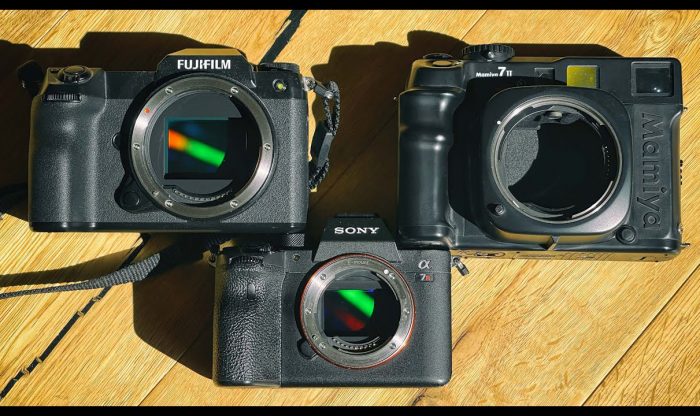
-The exposure scale in the viewfinder should go from -3 to +3 or more! It’s just grayed out? Why? Cameras like the Fuji GFX go from -5 to +5 and it’s really helpful in some environments, especially when shooting with flash when the camera is no longer showing true exposure.
-Skip over grayed out items in settings! If I change focus area, why do I have to click over every grayed out area? It’s a waste of time. Maybe studio people don’t care? Did you build this camera to live on a tripod? Also allow all settings to be changes in the menu! Why do you gray out settings just because you are not shooting in that mode right then? Freaking ridiculous
-PLEASE add focus tracking for whatever size focus area I’m shooting with! On Nikon d850, when shooting 3D tracking, if you have only one point selected, the camera tracks only that one point. I don’t want to be distracted by a giant green ever-changing rectangle! Keep the focus point size!
-Allow the focus point rectangle to be completely customizable. On Fuji cameras, when selecting focus point, you can turn a dial to make the point larger or smaller. Do something like this!
-Add an intervelometer for people who want it.
-Please add the ability to add continuous focus TOGGLE to a custom button. If I’m shooting single focus and then a bride is walking, I want a button to toggle continuous focus. This can be done on Canon 5D and I love it.
-Add auto review of 1 second and also .5 seconds in menu. Fuji GFX does this and it makes auto review in EVF great. I can see if someone blinked in .5 seconds and then preview is gone.
-Add ability to have auto review on LCD ONLY. So it would act more like an OVF camera. For instance – when shooting, auto review wouldn’t show in EVF but if I pull my eye away from the finder, the auto review is on the LCD. This is how Canon and Nikon and everything else functions without an EVF. Make this an option.
-Please add the ability to remove things from the finder. On Fuji GFX you can literally add or take out everything and have a blank slate if you want, or show just aperture and shutter speed, or battery life… Whatever. It’s a beautiful thing.

Things to add in next body
-Add a bloody top plate OLED! Fuji implemented this beautifully in the GFX
-Add a second processor? Why in the crap is there still lag in these cameras!?!?!? You can process 10 42megapixel images a second and throw them onto an SD card, but you can’t make a dial respond instantly?
-Add an ISO Dial?
-Move to XQD for rIIII and a9II?
-Make opening to EVF LARGER!! EVF is gorgeous, but when shooting with glasses on, I can’t see the edges of the frame! What the heck?

Just some last comments
Sony – You are now competing with the big boys and probably taking them over. Canon will die soon if they don’t change. You have done some amazing things in the last few years, but you need to do better. The A7R series has been priced with Canon 5D and Nikon 800 series since the start, but it hasn’t had all the pro features. With the release of the A7RIII, it finally has dual cards and better features to be able to compete and surpass many other cameras, but please pick up a d850, 5DIV maybe a GFX, and who knows maybe a Pentax camera, find what makes them great, and add everything they do only better. Fix the lag. Also know that you are now selling to potential professional shooters that have been shooting for a decade or many decades. Fix the menus. Know your customer. This isn’t someone buying an NEX 3 years ago! Make the menus and features pro. Don’t be afraid to add more defined settings. Heck add a setting to switch to basic mode for the random parent who buys it to shoot their kids. But make the default mode ready for a working pro to pick up the camera and customize every single piece of the thing.
Don’t be afraid to take over the camera market. Don’t be afraid to step on Nikon and Canon’s toes. Just make the best camera that has ever been made and be proud of it and then dominate. You have the ability to do this but you keep making these incremental baby steps, as if you are scared to annihilate the other guys.

Be a company who takes care of their customers with great service and firmware updates. People love fuji for this. Do the same. Don’t be some distant robot that doesn’t listen to people.

I have been shooting weddings full time for close to a decade. I started on Sony, then switched to Canon when Sony service badly failed us. Now I fully shoot Sony again but with all Canon glass. I love the cameras but I also put up with things that many pros just wont. I Also shoot the Fuji GFX which is bloody amazing but lacks a good fast standard so that makes it hard for weddings. I love you as a company but these things need to change and then who knows, in 3 years, you just may be the top dog. People don’t laugh at Sony anymore, but the majority of pros still aren’t ready to mess with a system that just has too may problems to put their full trust in. My all time favorite camera was the Sony a850. It had the best feel. The shutter was amazing, the interface was good if I remember correctly, the viewfinder was one for the history books, and it just had a glorious analog feel to it. Bring back a little bit of that Minolta history and feel and breathe a little “life” into the somewhat lifeless robotic a7 series. That will make Sony great.

Cody
Hunter Ryan Photo
http://hunterryanphoto.com
https://www.instagram.com/hunterryanphoto
https://www.instagram.com/codyhunterphotography

Sony Tidbits…


You’re shooting astophotography ALL WRONG – ISO invariance

My Experience Switching Nikon To Sony, For PHOTO, A6500 Vs D750 (Mitchell Millennial).
SONY VS CANON – 8 HUGE reasons why I SWITCHED to Sony (Serhio Kozhan).
Video: 10 Lightroom features you may not know about (Dpreview).
NAB 2018: New Cine Lenses (Explora).
Aputure 120dII COB LED Light (Personal View).

Share your best pictures on our new Instagram SonyAlphaGallery.

Personal photos and tests from SAR Admin Andrea on Instagram, Twitter, Facebook, Flickr and 500px.

Craig:Found this video, and a cool series of videos by Sony called LENS STORIES—there are a bunch. Anyway, here is a 30 year veteran National Geographic photographer who uses and loves a lens so many hate: The Sony/Zeiss 24-70 f4. I’ve always wanted to own this lens, and rented it once for a job. I loved it and had one of my clients made a ad poster from the image with this lens. Just wanted to share because it gets such a bad rap. Sure, on test charts it may not be the best, but in real life, it’s a top notch lens. He is betting his career on it, literally. As the images he takes, will be sold to collectors and for stock for lots of money. https://www.youtube.com/watch?v=tP8_gCVltlc

We have our own Facebook camera groups and pages you can join to discuss the upcoming new cameras in detail:
Sony A9 group and Sony A9 page.
Sony A7rIII group and Sony A7rIII page
Sony A7sIII group and Sony A7sIII page
Sony A7III group and Sony A7III page
Note: In groups you can post your own stuff like images, news and questions. While on pages you will read the specific camera news from SAR.


Sony Tidbits…


Five Things I Hate About The Sony A7 III – Tomorrow – 5 Things I Love!

Darktable 2.4.3 adds A7III support.
Sigma 16mm f1.4 DC DN | C Review (Mirrorlessons)
NAB 2018: LaCie Gets Adventurous with Rugged RAID Pro (Explora).
Ikan Pivot Gimbal, can handle large cameras (Personal View).
William Klein shoots Sony at 90 years old

Share your best pictures on our new Instagram SonyAlphaGallery.

Personal photos and tests from SAR Admin Andrea on Instagram, Twitter, Facebook, Flickr and 500px.

Stan Moniz:I wanted to share these two new video I did shot with the new Sony A7III / Sony Zeiss 55mm F1.8 / SLR Magic Anamorphot-40 1.33x Anamorphic Adapter (Compact) and the ocean one with the Aquatech Elite A7 water housing. Something new with the anamorphic that people might dig. Hope all is well man.
https://youtu.be/FnJRLs2QG9s
https://youtu.be/8eVNTEWVhIs


Join the new Sony Alpha Camera Facebook group.
To get news from our Forum subscribe that RSS feed.
I kindly invite you all to follow our RSS feed, follow us on Facebook and Twitter to not miss news and rumors

Sony interview at IR: “The 400mm f/2.8 GM will be light and easy to handle”

Kenji Tanaka from Sony has been interviewed by Imaging Resource. A couple of highlights:

About future sensors:
“Our semiconductor team already has techniques ton improve both low ISO and high ISO more. We can implement them in a new sensor.”

About Artifical Intelligence:
“That kind of technology is improving very fast. For example, our current processor has some general computing unit, but maybe in the next generation, the general computing CPU should become more designed for AI.”

About the upcoming 400mm f/2.8 FE lens:
“We try to make our lenses easy to manipulate (meaning that the size is very compact), easy to use (meaning that the weight is light), well-balanced… So please, after we launch the 400mm f/2.8, try it. Maybe you’ll appreciate what I’m saying.”

About the APS-C E-mount future:
“Please wait. Don’t worry, APS-C users!”

Sony Tidbits…


Talking Business, Gear & Life | Q-Interview with Zeiss Ambassador Greg Watermann

Sony a9 has no AA filter (Blog Kasson).
Manfrotto Befree Advanced Tripod (Personal View).
Canon shows off full-frame sensor that shoots 100fps Full HD in ‘exceptionally low-light’ (Dpreview).
Audio recorder review for Sony A7iii – Sound Devices MixPre-3, Strut STR-MixPre-3 (HikeVentures).
En-“light”-en Your iOS Video Rig With Manfrotto’s Lumimuse 8 Bluetooth (Explora)
A7III test at DC.watch.

Personal photos and tests from SAR Admin Andrea on Instagram, Twitter, Facebook, Flickr and 500px.

Share your best pictures on our new Instagram SonyAlphaGallery.

ON1 Photo RAW 2018.5 released

ON1 Photo RAW 2018.5 has been released:
ON1 Photo RAW 2018 Product Page: https://www.on1.com/affiliates/idevaffiliate.php?id=818_122
The Photo RAW Project Exposed: https://www.on1.com/affiliates/idevaffiliate.php?id=818_118

Press text:

ON1 Photo RAW 2018.5 – Coming this June

Portland, OR – May 10, 2018 – Today, ON1, Inc. announces the new ON1 Photo RAW 2018.5, a significant update to Photo RAW 2018. Version 2018.5 will include a massive boost in overall performance, fixes for user reported issues, and new key features such as LUTs and camera profiles.

“We’re incredibly excited to unveil the new features in ON1 Photo RAW 2018.5 over the next several weeks. We plan on showcasing the new features and improvements through weekly videos leading up to the June release,” says ON1 President, Craig Keudell.

Key Features and Improvements

  • Camera Profiles – Select the same looks you see on the back of your camera in ON1 PhotoRAW. Select from Natural, Portrait, Landscape, etc. depending on what your camera offers. These are not presets as they don’t adjust any of the sliders, and are non-destructive. These will include popular cameras like Fujifilm®.
  • LUTs in Effects- LUTs or Look-Up Tables are a favorite way to add matte, vintage or cinematic color grading looks. These will be available inside Effects in version 2018.5. A ton of LUTs will be available in the release along with individual packs from Matt Kloskowski, Tamara Lackey, and Hudson Henry. The common .3DL and .CUBE formats found online can be imported into Photo RAW. LUTs will work like any of the current filters in Effects. You can stack them, mask them and control the blending options.
  • RAW+JPG – If you shoot RAW and JPG at the same time, you will be able to collapse and hide the JPG copy, so your library isn’t cluttered. Any metadata or file changes you make are mirrored to the JPG seamlessly.
  • Faster Film Strip for Culling – Using the Filmstrip in Develop and Effects will be just as fast as in Browse. You will be able to switch photos instantly! You can even perform your editing and culling tasks, like ratings, labels, rotate and delete, while you are adjusting your raw processing.
  • Transform Enhancements – The Transform pane in Develop will include new tools to correct perspective and rotation issues along with a new grid will make it easier to visualize results.
  • Nested Presets – Ability to better organize presets into a nested category structure will be added along with the ability to move, rename, delete, and nest presets and categories.
  • Nested Albums – Nest albums or photos inside of other albums. If you are migrating from Lightroom®, your nested collections are brought over by the Lightroom migration assistant.
  • Improved Brushing Performance – Brushing with the Masking Brush will be more fluid and responsive, especially on Windows computers with large or high-dpi displays.
  • Background Export – Exporting will be processed in the background so customers can continue to work on another job without having to wait for the export to finish. You can even stack multiple export jobs and continue working on your photos.
  • Performance Boost & Increased Stability – Significant under the hood speed and stability improvements are coming in 2018.5. These include speedier switching of modules between Browse, Develop, and Effects along with switching and culling photos using the film strip in Develop and Effects.
  • New Cameras & Lenses – Each update includes new cameras and lenses. The list is continuously updated, and we will share the final details when version 2018.5 is released.

ON1 Photo RAW 2018.5 Exposed

Each week ON1 will be adding videos showcasing the new features and improvements available in version 2018.5. Get a sneak peek of the new camera profiles, new LUTs, and overall performance improvements at www.on1.com/exposed.


Price and Availability

ON1 Photo RAW 2018.5 will be available this June. New customers can purchase version 2018.1 today and receive 2018.5 as a free update once it becomes available. ON1 is running an introductory price of $99.99 for new customers for a limited time (Reg: $119.99). Owners of previous versions of ON1 can also upgrade at an introductory price of $79.99 (Reg: $99.99). Version 2018.5 is a free update for all owners of ON1 Photo RAW 2018. A single purchase of ON1 Photo RAW will include both Mac and Windows installers and activation for up to five computers. It comes with a 30-day money-back guarantee, world-class customer support, hundreds of free video tutorials, and free ON1 Loyalty Rewards every month.

About ON1 Photo RAW

ON1 Photo RAW is the only photo editor designed by photographers for photographers. ON1’s unique community-driven development approach via The Photo RAW Project gives customers a voice in how it’s designed, allowing users to submit ideas and vote on new features. The majority of new features and updates in version 2018.5 have come as a result of the Photo RAW Project. With fast photo organizing, hundreds of customizable photo effects, powerful masking tools, LUTs, Camera Profiles, HDR, panos, layers, and other Lightroom and Photoshop®-like features, Photo RAW is the ultimate all-in-one photo editor and raw processor with no subscription.

ON1 Photo RAW 2018.5 isn’t just for raw files. It also supports JPEG, TIF, PSD, PSB, PNG, and DNG are supported and benefit from the speed, performance, and abundance of editing tools in the app. Photo RAW 2018.5 will continue to work seamlessly within current photography workflows. The app will integrate as a plug-in for Adobe® Lightroom Classic CC and Photoshop CC. Like the current version, Photo RAW 2018.5 will integrate with the major cloud services to allow for uploading, managing, and editing photos across multiple computers. This enables users to sync photos and their edits across multiple computers or in a studio setting.